PDF Desk · free for Chrome and Edge
Sign PDFs free, without uploading them.
Sign without printing or scanning, fill form fields, and merge or split PDFs in Chrome or Edge. No uploads, no account, no watermark.
Coming soon to the Chrome Web Store. It isn't available to install yet. Questions before then? support@gabbaworks.com
Free: signing, fillable forms and page tools. No account, no watermark, no daily limit.
How it works
- Open a PDF in PDF Desk, straight from your computer.
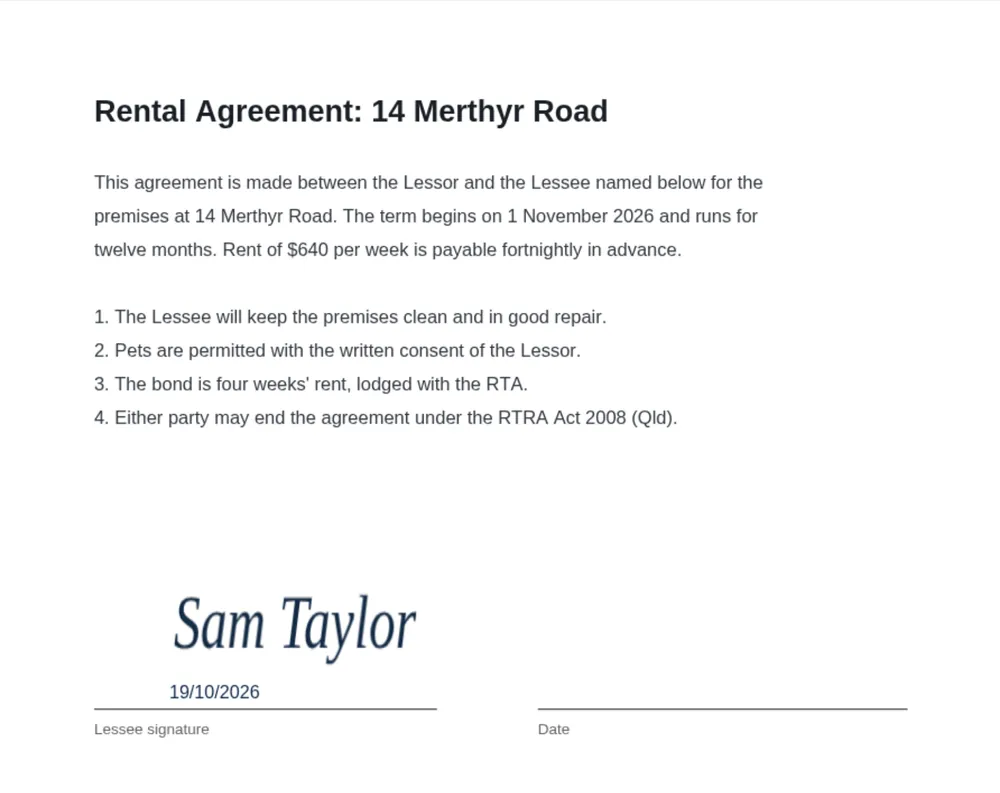
- Sign or fill it. Draw, type or upload a signature, add the date, or type into the form's fillable fields.
- Save your copy. It downloads like any other file. Nothing was uploaded.
Need several documents together? Merge PDFs, then reorder, rotate or delete pages before saving. Already signing in your browser's built-in PDF viewer? It can't merge, split or reorder pages. PDF Desk does that for free.
What's included, free
- Sign: draw, type or upload a signature, place and resize it, add today's date, and save it for next time
- Type into a PDF's existing fillable fields: text, checkboxes, radio buttons and dropdowns (scanned forms can be signed, not typed into)
- Merge, split, reorder, rotate and delete pages
- No watermark, no sign-up, no daily limits
Sign the lease at your kitchen table. Not on someone's server.
Your PDFs are processed on your computer and are never uploaded. PDF Desk makes no network requests at all, and there are no analytics, tracking or ads. The only thing it keeps is any signature you choose to save, in your browser. The privacy policy has the details.
Questions people ask
Can I sign a PDF without Adobe Acrobat?
Yes. PDF Desk runs in Chrome or Edge. Draw, type or upload your signature, place it, and save. You don't need Acrobat, a login, an account or a printer, and the saved PDF has no watermark.
Is PDF Desk really free?
Yes. Everything PDF Desk does is free, with no watermark, trial, account or daily limit.
Does the person I send it to need PDF Desk?
No. The saved file is an ordinary PDF that opens in any PDF viewer.
Is it a free PDF editor for Chrome?
It's free for signing, form filling, merging, splitting and page tools, with no watermark. It can't change text that's already in a PDF.
Can I edit a PDF offline?
You can sign, fill existing form fields and organise pages offline, for free. PDF Desk never needs an internet connection. You can't change text that's already in the PDF.
Will my form work?
If the PDF has standard fillable (AcroForm) fields, you can fill the editable ones: text, checkboxes, radio buttons and dropdowns. Form text is limited to Western European characters for now (English, French, German, Spanish and similar), so letters such as Ł or ệ and non-Latin scripts can't be typed in yet. Scanned forms have no fields, so you can sign them but not type into them. XFA forms aren't supported.
When can I install it?
PDF Desk is coming soon to the Chrome Web Store. This page will link to the listing as soon as it's live. Microsoft Edge can install extensions from the Chrome Web Store.
Limits, honestly
- It can't edit or delete text already in a PDF, redact, compress, password-protect, or create new form fields.
- Merging or splitting a PDF flattens its form fields.
- Form filling works with standard (AcroForm) fields and Western European characters (English, French, German, Spanish and similar). Letters such as Ł or ệ and non-Latin scripts can't be typed into form fields yet. Scanned forms can be signed but not typed into. XFA forms aren't supported: PDF Desk asks before saving a copy without the XFA layer.
- Password-protected PDFs can't be opened. Signature images must be PNG or JPG, up to 5 MB and 40 megapixels.
- Works in Google Chrome and Microsoft Edge on desktop.
Questions? Support or support@gabbaworks.com.